
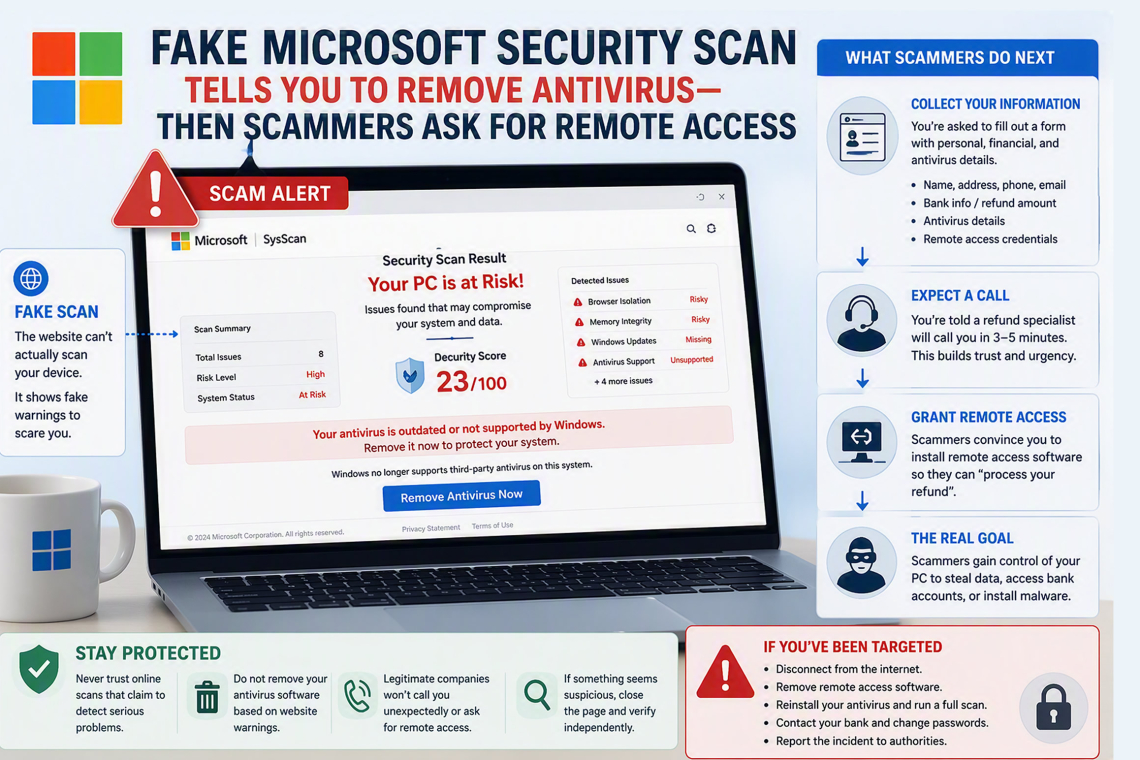
A newly discovered scam campaign is exploiting fake Microsoft-branded security scans to convince users that their computers are at risk, ultimately manipulating them into removing antivirus protection and providing remote access to cybercriminals.
The fraudulent websites claim to perform comprehensive security assessments, presenting alarming reports that warn of critical vulnerabilities and insist that third-party antivirus products are no longer supported by Windows. These assertions are entirely false but are carefully crafted to create urgency and persuade victims to take immediate action.
To make the deception appear credible, the scam pages collect basic browser and device information, including screen resolution, operating system details, and hardware characteristics. This data is then incorporated into a fabricated security report that appears customized for the visitor's system. The true objective, however, is not malware delivery but a sophisticated refund scam designed to gain access to sensitive information.
Researchers at Malwarebytes identified at least 11 interconnected websites operating from the same server infrastructure. Each site uses similar SysScan branding and falsely presents itself as a Microsoft-affiliated security service. Visitors are repeatedly told that their antivirus software is responsible for the supposed issues detected on their systems.
Unlike traditional scams that begin with malicious downloads, this operation relies on a staged process involving a convincing website, fabricated security scores, personal information collection forms, and follow-up phone calls. By the time victims are asked to install remote-access software or disclose financial information, many believe they are participating in a legitimate support or refund procedure.
Fake Security Reports Designed to Create Panic
The scam sites display security findings that no standard website is capable of verifying. Visitors are warned about alleged problems involving firmware security settings, browser isolation failures, memory vulnerabilities, missing Windows updates, and processor-related performance concerns.
In reality, a webpage cannot perform deep system-level diagnostics or accurately determine the operational status of antivirus software.
The deception works because some of the displayed information is genuine. Modern browsers can provide limited data such as operating system versions, processor counts, screen dimensions, browser capabilities, and permission settings. The scammers combine this legitimate information with pre-programmed warnings to create the illusion of a sophisticated security assessment.
Investigators discovered that many of the reported security issues are hard-coded into the websites rather than generated through actual analysis. The scoring system is similarly manipulated, ensuring every visitor receives a poor rating, typically between 13 and 30 out of 100, regardless of the device being evaluated.
This fear-based tactic mirrors previous fake antivirus and technical support scams that rely on alarming warnings to pressure users into making flawed security decisions.
The Dangerous Push to Remove Antivirus Software
One of the most concerning aspects of the scam is the instruction to uninstall antivirus software.
The websites falsely claim that third-party antivirus products are incompatible with Windows or are causing severe system issues. While Microsoft Defender may enter a passive mode when compatible third-party security software is installed, Windows continues to fully support numerous antivirus vendors.
Attackers understand the value of weakening endpoint defenses before attempting additional fraud or system compromise. By convincing victims to disable or remove security software, they increase the likelihood of successful exploitation later in the process.
.webp)
Users should be highly skeptical of any website claiming to perform a comprehensive security scan through a browser. Legitimate technology companies do not require customers to uninstall security products as a prerequisite for technical support, refunds, or security assessments.
When a website reports only severe problems and insists on immediate corrective action, closing the page is often the safest response.
Fake Refund Process Leads to Remote Access Fraud
After displaying the fabricated scan results, the scam transitions into a fake refund workflow.
Victims are presented with a detailed form requesting personal and financial information, including names, addresses, phone numbers, email addresses, banking institutions, purported refund amounts, cryptocurrency account identifiers, antivirus products, and remote-access session details.
Researchers also observed fields for agent names, employee IDs, and company information, suggesting that scammers may guide victims through the process during a live phone conversation.
Perhaps most concerning, the form allows users to select from dozens of remote-access applications. This gives threat actors a direct path to obtaining control of the victim's computer under the guise of processing a refund.
.webp)
According to Malwarebytes, the collected information is transmitted to attackers using Telegram's bot infrastructure. Victims are then redirected to a page claiming that a refund specialist will contact them within minutes, while a looping office-themed video reinforces the illusion of legitimacy.
Once remote access is granted, criminals may be able to view sensitive files, access online accounts, monitor financial transactions, and maintain persistent access to the compromised device.
What To Do If You Have Already Engaged With the Scam
Anyone who has installed remote-access software or granted access to an unknown party should act immediately:
- Disconnect the device from the internet.
- Uninstall any remote-access software used during the interaction.
- Reinstall any antivirus software that was removed.
- Update security software and perform a full system scan.
- Change account passwords from a separate trusted device.
- Review systems for unauthorized activity.
- Contact financial institutions immediately if banking information was shared or online banking sessions were accessed.
Key Takeaway
This scam demonstrates how cybercriminals continue to exploit trusted brands such as Microsoft to create convincing support fraud schemes. By combining fake security scans, misleading technical warnings, and refund-related social engineering, attackers can persuade victims to voluntarily weaken their own defenses and hand over remote access.
Users should remember that a website cannot perform a complete security assessment of a computer and that legitimate support providers will never require the removal of antivirus software as a condition for assistance. When confronted with alarming security warnings delivered through a browser, verification through official channels remains the best defense.
Found this article interesting? Follow us on X(Twitter) ,Threads and FaceBook to read more exclusive content we post.
